
One platform, run with confidence: AlMuraji features
On top of accounting, sales, purchasing and inventory, AlMuraji gives management what it needs every day: live dashboards and reports, automation that follows up for you, precise permissions, mobile apps, and an easy start that brings your data across in your first working days.
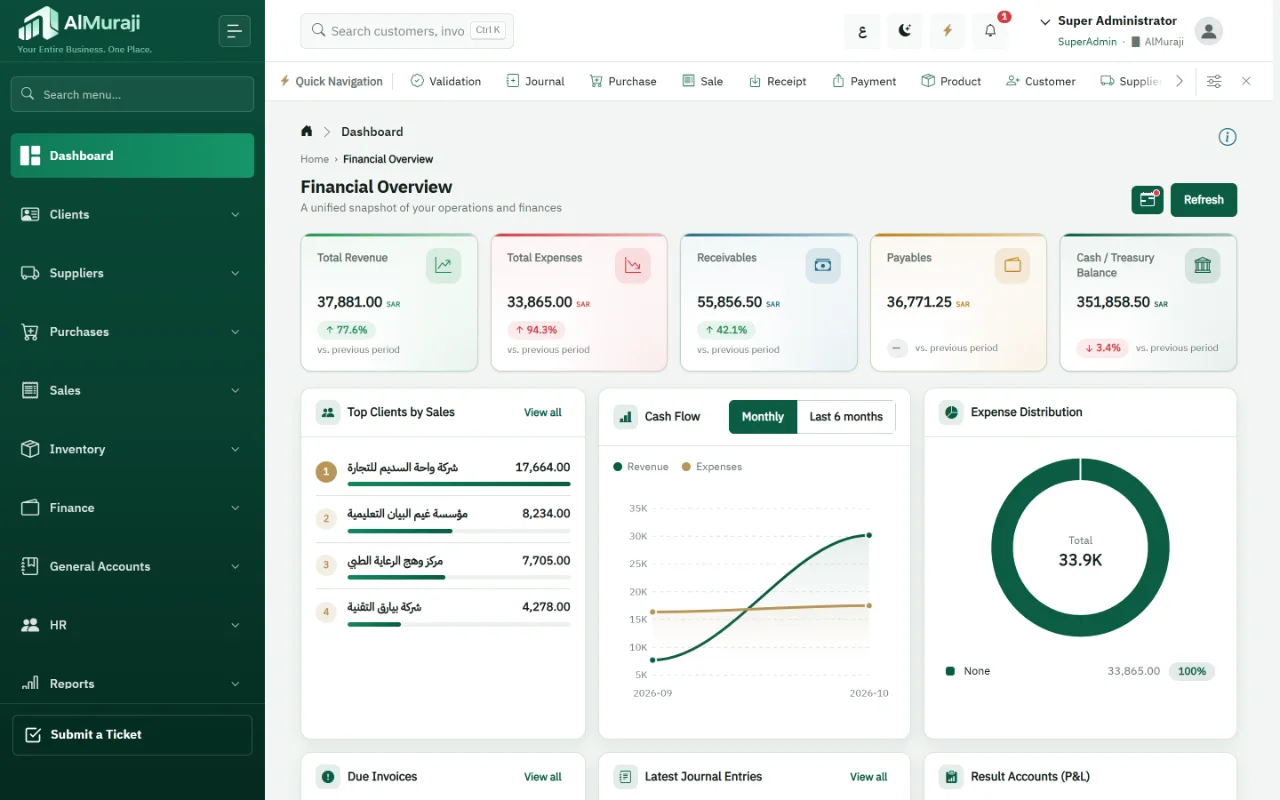
Mobile & executive management
Decisions from your phone, operations from anywhere
An executive app with indicators and reports when you need them, an operations app that puts the whole system in your team's hands, and a responsive version that works in any mobile browser.
What it means for you: Follow revenue, collections and cash away from the office, and decide on current numbers rather than yesterday's reports.
Executive app
An indicator dashboard, finance, sales performance and four interactive reports: income statement, balance sheet, sales summary and receivables aging, compared with the previous period and drilled down within your permissions.
Operations app
The same system on a phone: invoices, vouchers, stock and reports, with the same permissions an employee has on the desktop.
Mobile browser
A responsive interface that works in any phone or tablet browser without installing anything.
Secure sign-in
Organization code, user name and password, with a one-time code (OTP) for users who have it turned on.
In practice · A general manager on a business trip
Opens the executive app to see the week's sales and overdue receivables, then opens the income statement and compares it with last month before a meeting.
Add-on The executive app is an add-on.
Mobile apps in detail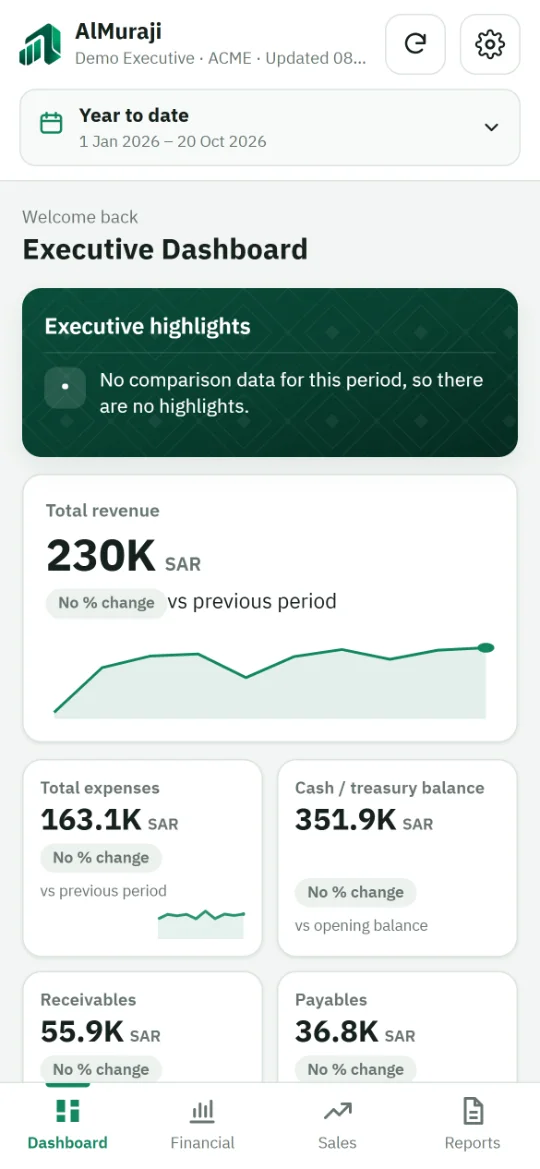
Reporting & dashboards
Your numbers, ready when you need them
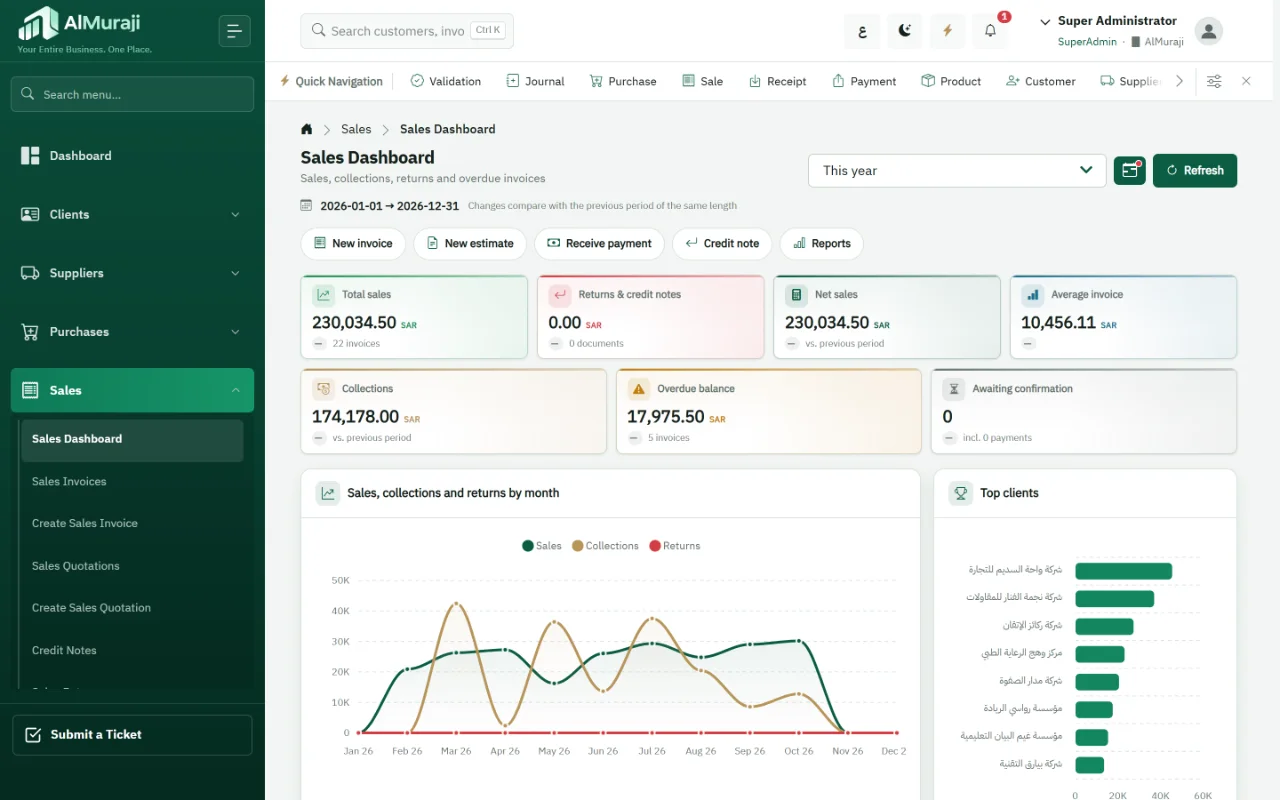
A main dashboard with the state of the business, a dashboard for each department, and 60+ ready-made reports that export to Excel and PDF, with instant search that reaches any record.
What it means for you: Fewer hours spent building reports by hand, and sales, stock and the books agree because they come from one source.
A dashboard per department
A main dashboard, plus dashboards for customers, suppliers, sales, purchasing, inventory, finance, general accounts and HR, compared with the previous period.
60+ reports
Financial statements, trial balance, aging, inventory, item profitability, manufacturing and tax reports, with filters and grouping.
Excel and PDF
Export and print lists and reports, and share a report by email with the sharing add-on.
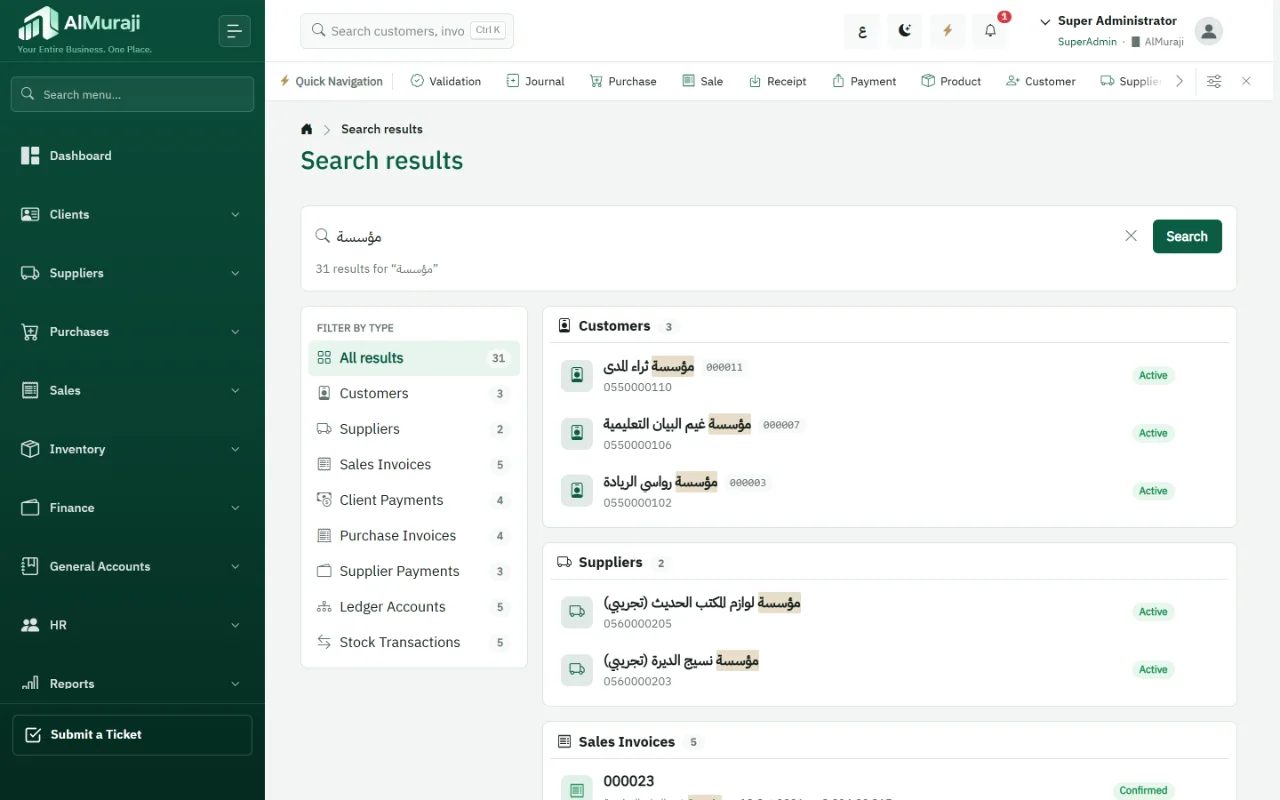
Instant global search
Search from the top of the screen across 19 record types: customers, suppliers, items, invoices, vouchers, journal entries, assets, employees and more, within your permissions.
In practice · An accountant at month end
Reviews the trial balance and receivables aging, exports both to Excel, then searches an invoice number to open it directly instead of browsing lists.
Easy onboarding & migration
From spreadsheets to the system, without the pain
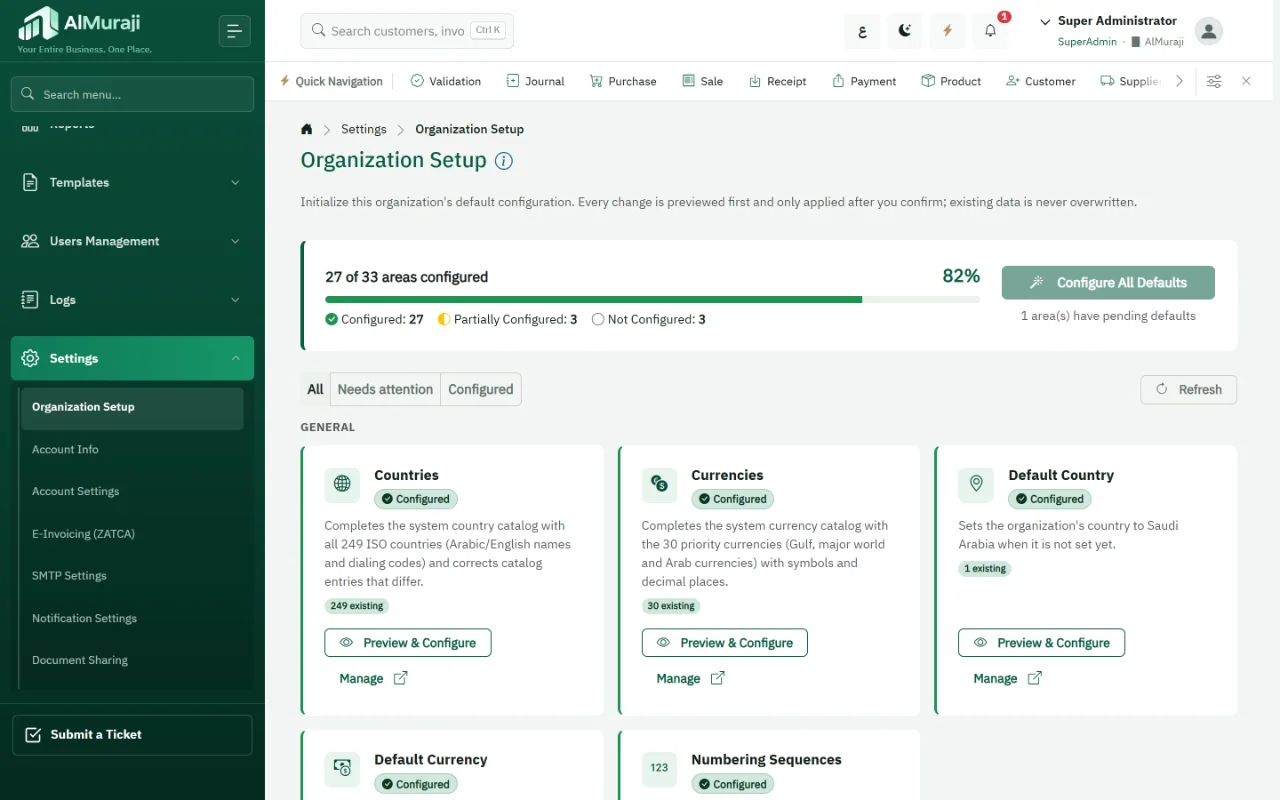
Set up the organization in one step with a preview before anything is applied, import your data from Excel with ready-made templates, and start from ready-made roles for each department.
What it means for you: You work on your real data quickly, without re-keying and without touching anything you entered before.
Configure all defaults
The organization setup screen shows configured and pending areas and previews changes before applying them; existing data is never overwritten.
Import from Excel
Customers, suppliers, items and employees; opening account and stock balances; invoices, returns, quotations and payments; and stock counts.
Preview and duplicate checks
Review rows before they are saved, and get warned about duplicates instead of creating them twice.
Ready-made roles
General Manager, Chief Accountant, Accountant, Sales Manager, Sales Representative, Purchasing Officer and HR Officer.
In practice · A business leaving spreadsheets
Imports its customer and item lists and opening balances from its current files, gives each employee a ready-made role, and starts invoicing.
Getting started
Three steps to your first invoice
- Set up the organizationApply the defaults after previewing them: accounts, routing, templates and numbering.
- Bring your dataImport customers, suppliers, items and opening balances from Excel.
- Start workingGive your team the ready-made roles and issue your first invoice, with its journal entry.
Customization
Your brand, your way of working
Your logo and interface colour, light or dark mode, custom fields you add yourself, print and email templates, and central master data.
What it means for you: The system fits your procedures instead of your procedures bending to the system, with no extra development.
Logo and colour
Your organization's logo and interface colour across every screen, for all its users.
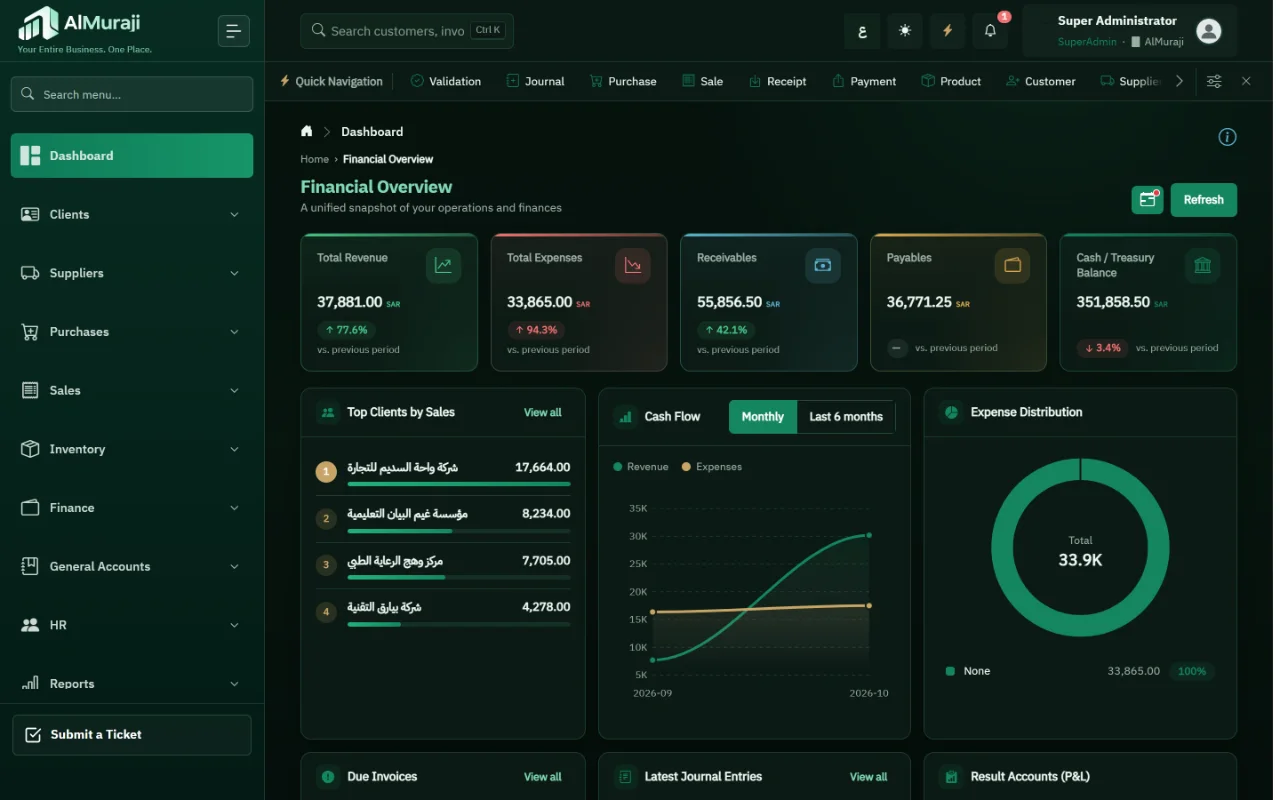
Light or dark
Each user chooses light or dark mode, with a compact sidebar when needed.
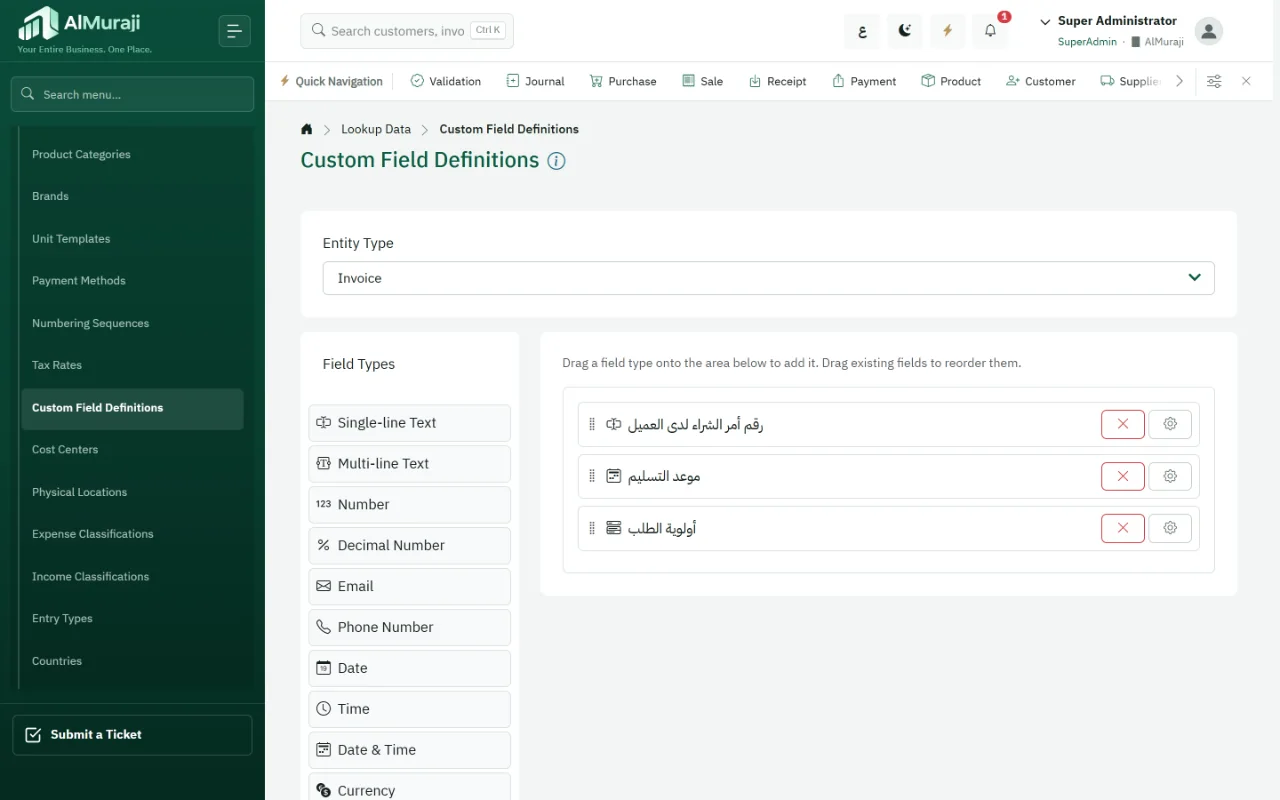
Custom fields
27 field types, including dropdowns, dates, attachments, map locations and sub-forms, on invoices, quotations, purchase invoices, items, customers, suppliers, journal entries, employees and assets.
Templates and master data
Print, email and terms-and-conditions templates, numbering sequences, and central management of items, categories, brands, units, price lists, currencies, taxes and payment methods.
In practice · A distribution company
Adds "Customer PO number" and "Delivery slot" fields to the invoice; both appear on the invoice and can be searched.
Add-on Custom colours and themes are part of the branding add-on; your logo is always available.
Light and dark mode
The same numbers, the way you prefer to read them
Each user switches between light and dark mode from the top of the screen, and the organization's colour and identity stay in both.
Automation & follow-up
The system follows up for you
Recurring invoices created automatically, customer reminders about what they owe, scheduled jobs, compliance reviews and in-app alerts.
What it means for you: No monthly invoice or due date slips through, and your team works instead of chasing.
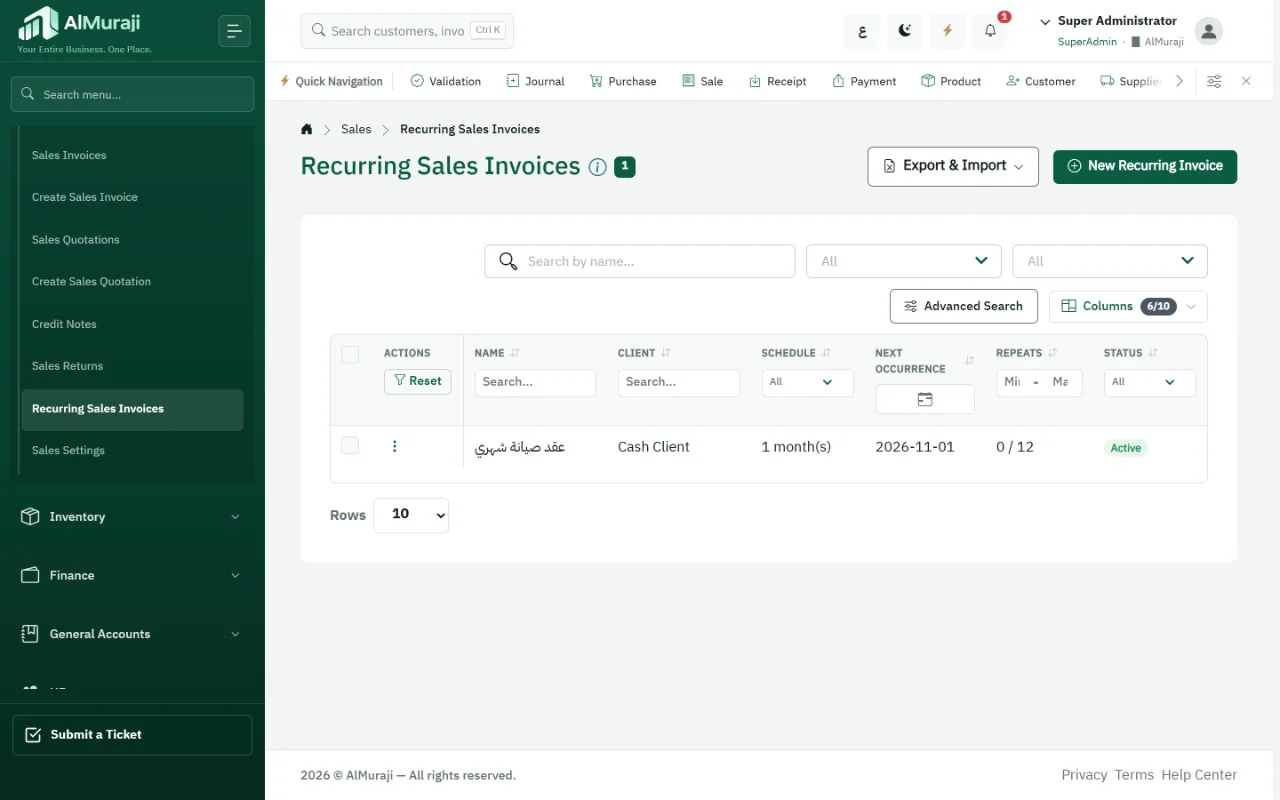
Recurring invoices
A maintenance contract or monthly subscription: set the interval and count, and invoices are created on schedule.
Payment reminders
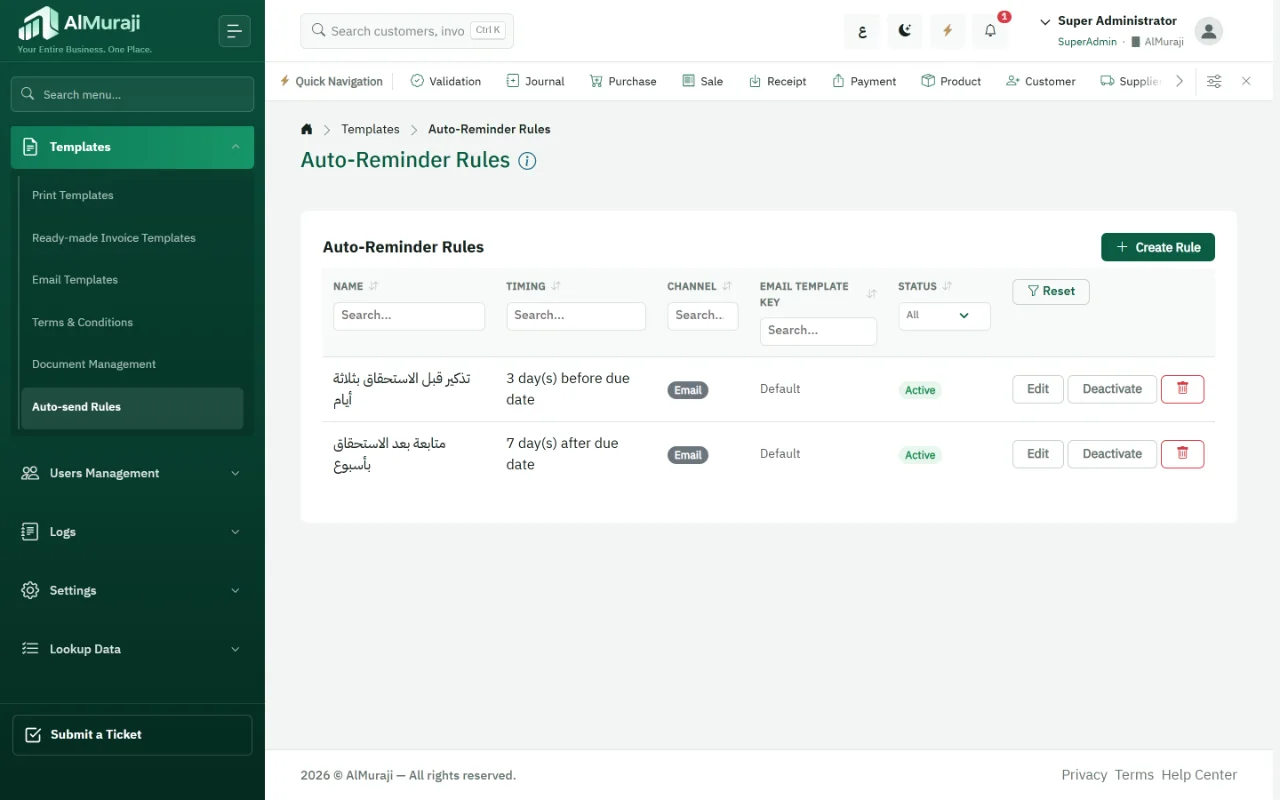
Rules that email the customer before the due date, on it, or after it.
Scheduled jobs
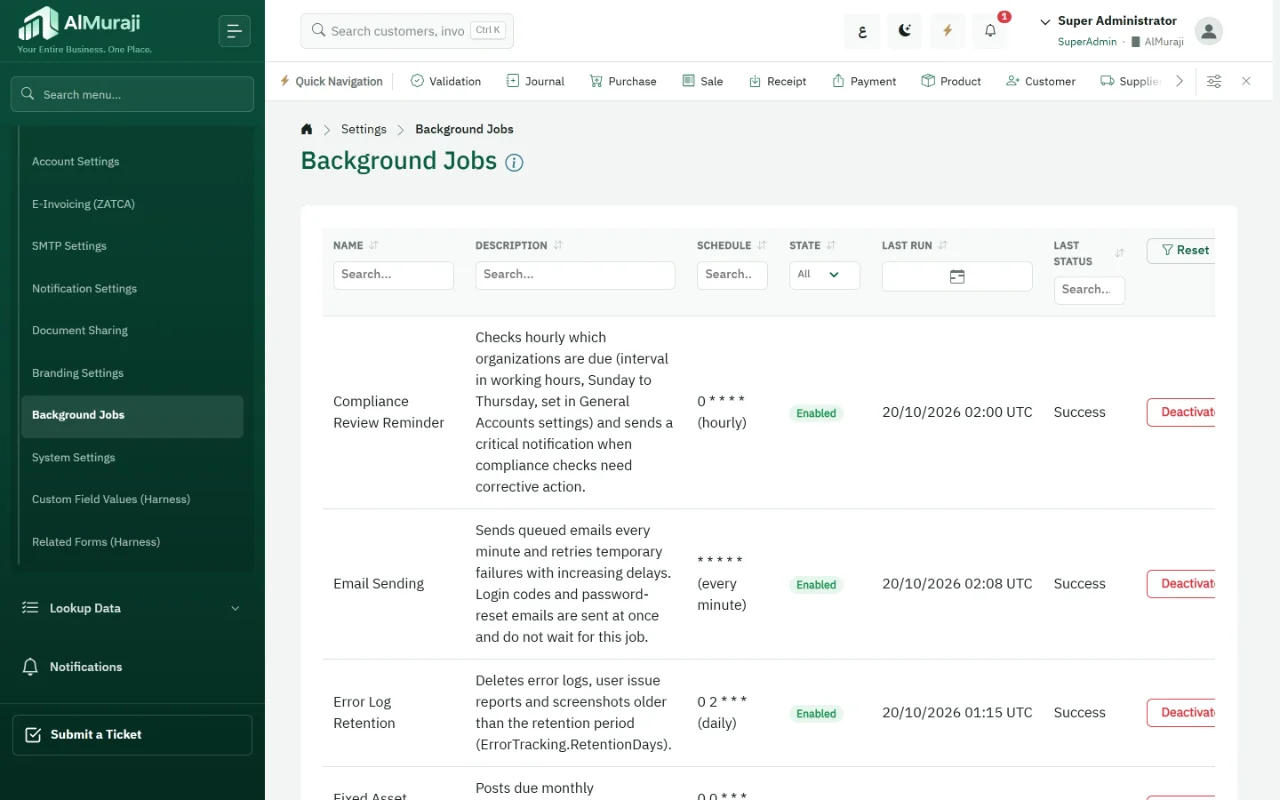
A background jobs screen shows each job and its last run and lets you switch it off: depreciation, e-invoice submission, alerts and email.
Compliance and alerts
A periodic operational and compliance review on your organization's schedule, and in-app alerts for low stock, reconciliation differences and expiring employee documents.
In practice · A service company with monthly contracts
The maintenance invoice is created on the first of each month, and the customer gets a reminder three days before the due date and a follow-up a week after.
Add-on Recurring invoices, reminders and the compliance review are part of the automation add-on.
Automation journey
From contract to collection without manual chasing
- Recurring invoiceCreated on schedule from the monthly contract
- Sent to the customerBy email or WhatsApp from the system
- Reminder before dueFollowing the rule you set
- Follow-up afterAnd an in-app alert for anything that needs action
Steps depend on the modules turned on for your organization (automation and sharing).
Sharing & collaboration
Send it from where it lives
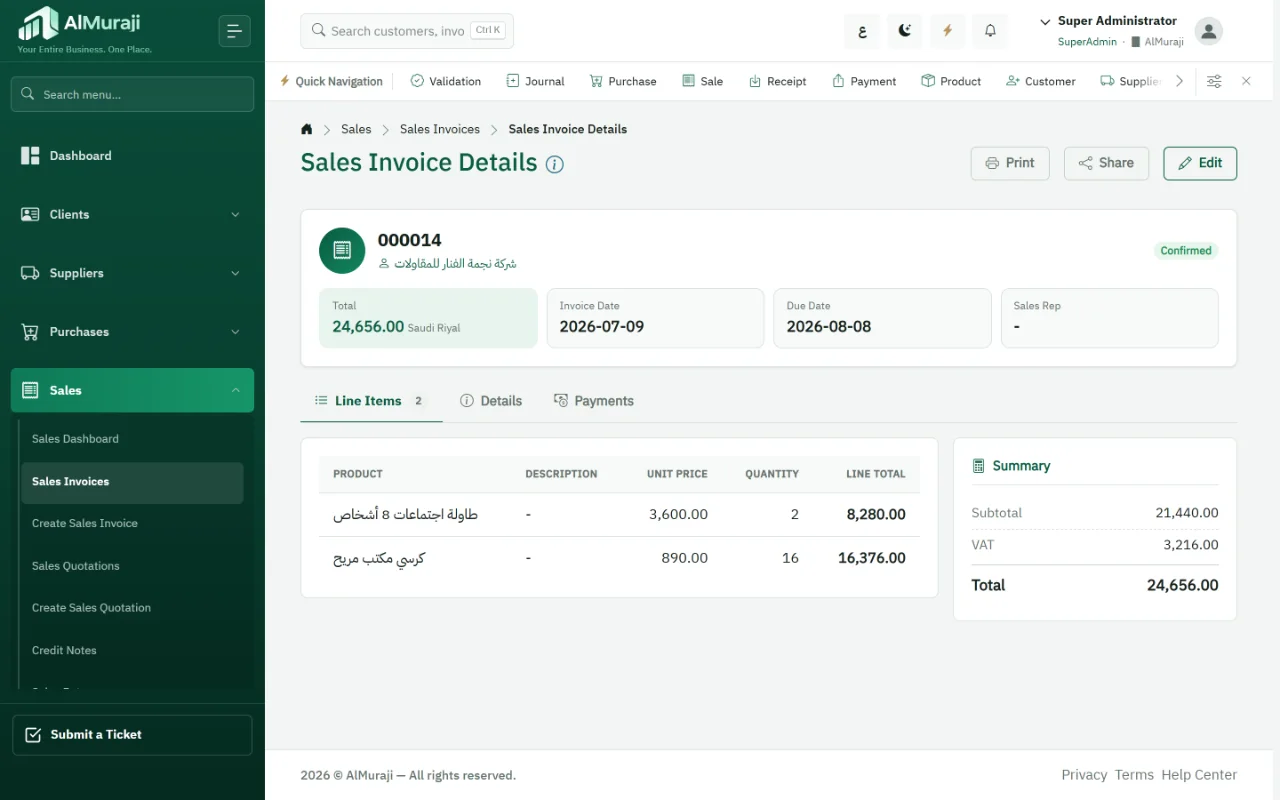
Invoices, documents and reports go out by email or WhatsApp from the same screen, with a log of everything sent.
What it means for you: Documents reach your customer in minutes, with no manual download and attach, and a clear record of what went out and when.
Email
Send invoices, documents and 60+ reports with Arabic and English email templates.
WhatsApp
Share a document over WhatsApp with a ready message.
WhatsApp Business
Connect your organization's own WhatsApp Business account through Meta to send documents from the system.
Sending logs
A sharing log and an email log show what was sent, to whom and when.
In practice · A sales representative
Confirms the invoice and sends it to the customer over WhatsApp from the invoice screen, then emails the account statement.
Add-on Email, WhatsApp and WhatsApp Business sharing are add-ons.
Security & administration
Full control over who sees and does what
Flexible roles with permissions for each screen and action, ready-made roles per department, complete separation between organizations, and logs that keep a trace of every change.
What it means for you: Give each employee only what they need, know who changed what and when, and keep each organization's data apart.
Precise permissions
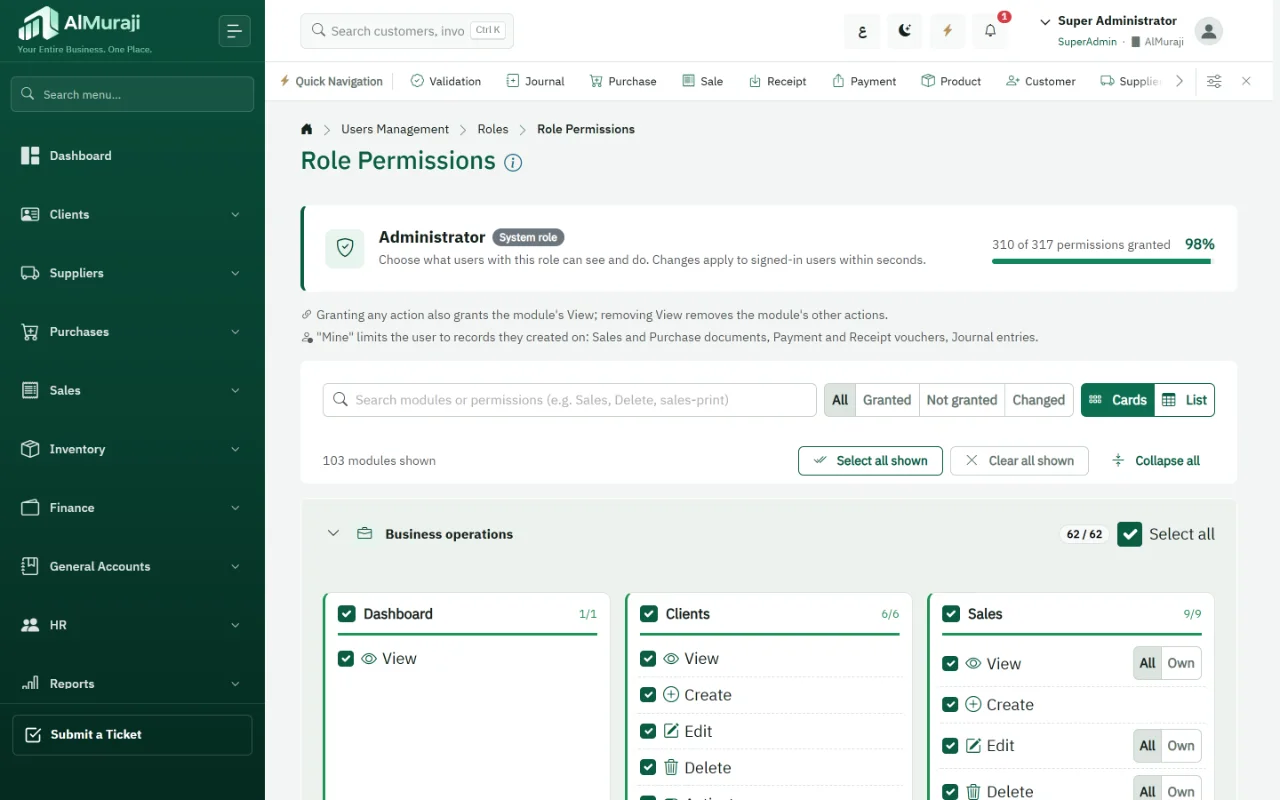
Separate actions in every module: view, create, edit, delete, print, Excel operations, approve, complete, cancel, reverse, view cost, and close or reopen periods.
By department and employee
Ready-made department roles, an "own records only" scope so staff see their own sales, purchase, voucher and journal documents, and selected pages hidden from any role.
Protected sign-in
A one-time code (OTP) per user, and Google reCAPTCHA on the sign-in screen when it is turned on in settings.
Complete logs
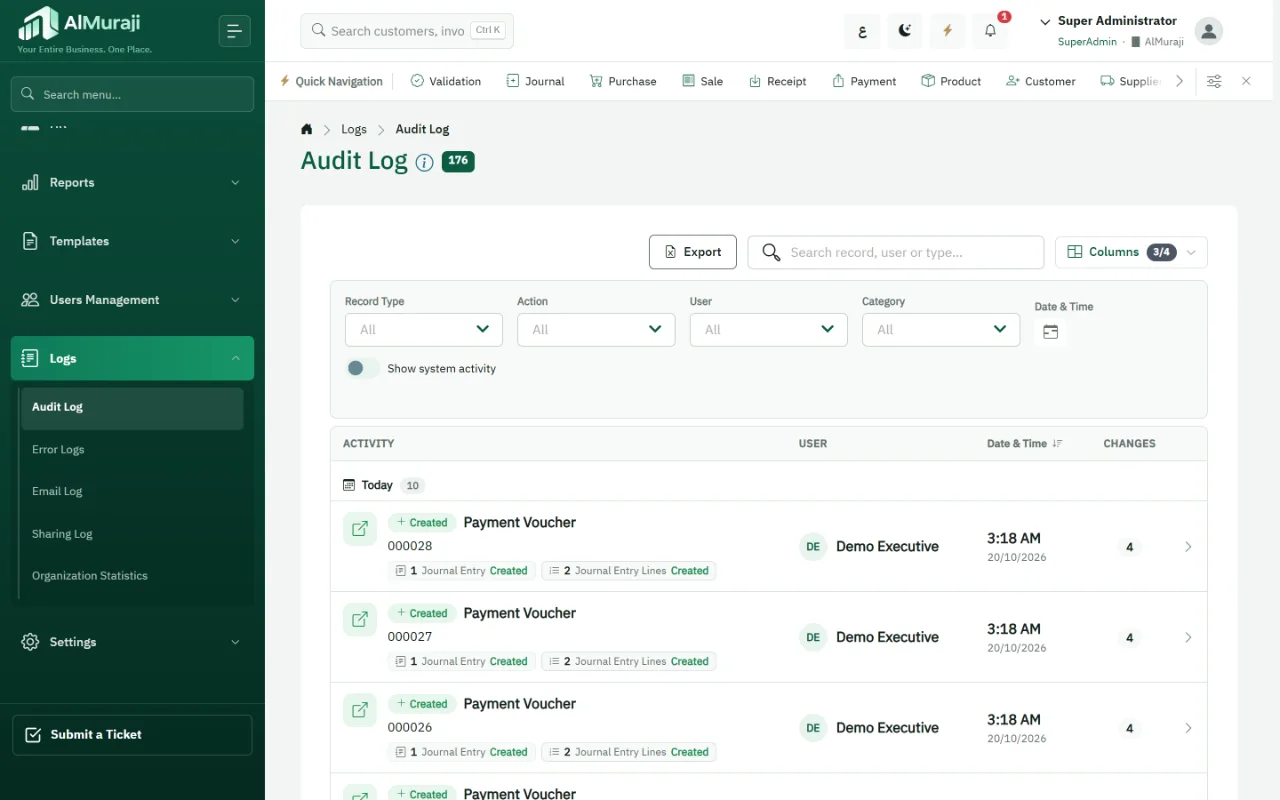
An audit log of changes, an activity log, an error log with reference numbers, and email and sharing logs, with each organization's data isolated from the others.
In practice · A chief accountant
Lets accountants create entries but not post them, hides cost from sales representatives, and checks the audit log for any edited invoice.
Arabic-first & technical support
Arabic-first, with support close at hand
Screens, reports and documents fully in Arabic and English in the right direction, and SLA-based technical support you reach from inside the system.
What it means for you: Each employee works in their own language, and your issue reaches support with its details, without a long explanation.
Arabic and English
Every screen, report and document right-to-left in Arabic or in English; each user picks a language, and system text shows in it.
Report from inside the system
A "Submit a ticket" button sends the issue with diagnostics and the screenshots or attachments you agree to send.
SLA-based support
Technical support is provided under a service level agreement (SLA), with its levels and response times set in your subscription agreement; follow your tickets on the support portal.
Help center
A user guide and help center inside the system, and API documentation for teams that connect their own systems.
In practice · A user who sees an error
Clicks "Submit a ticket" on the same screen; the ticket arrives with the error reference and the screen path, and is followed up on the support portal.
More capabilities worth knowing
Inside the same modules; some are turned on as add-ons.
Stock counts and stock requestsAdd-on
Count sessions whose differences are posted, and stock requests that go through approval.
Fixed assetsAdd-on
An asset register with scheduled automatic depreciation and book value.
Cost centers and budgetsAdd-on
Entry allocation and a budget versus actual report.
Period close
An explicit fiscal-year close, with reopening and unlocking as separate permissions.
Landed costs
Freight and clearance spread onto the cost of imported items.
Currencies and price lists
Foreign-currency invoices with the VAT total in SAR, and price lists for items.
Human resources
Employee files, contracts, documents and letters, with payroll runs that go through approval and employee loans in the payroll and loans add-on.
Multiple organizations
Run more than one organization in the same system, each with its own data and permissions.
Questions about AlMuraji features
Are these features in every subscription?
Dashboards, reports, search, import, permissions, logs and custom fields are part of the core system. Automation, sharing, the executive app, branding and others are add-ons turned on as you need them; the pricing page lists them.
Can I stop an employee from seeing cost?
Yes. Viewing cost is a separate permission, so a sales representative sees prices without item cost.
Can users sign in with a verification code?
Yes. A one-time code (OTP) can be turned on per user and is sent at sign-in, and the sign-in screen can be protected with Google reCAPTCHA from the system settings.
How do I get technical support?
From the "Submit a ticket" button inside the system, or from the support portal. The ticket arrives with diagnostics so it can be solved faster, and support is provided under the service level agreement (SLA) set in your subscription agreement.
See AlMuraji run operations like yours
Tell us about your business and the modules you care about, and we will arrange a demo.